
3ds Max Training in Bangalore
3ds Max Training in Bangalore at CADD Mentors. Learn 3D modelling, texturing, lighting and photorealistic rendering with V-Ray for architectural and interior design visualization.
Course Details
3ds Max Training
Duration
60 Hours
Mode
Classroom + Online
Software
Autodesk 3ds Max, V-Ray (intro) + more
Eligibility
Engineering / Design students · Professionals
Certificate
Included on completion
Delivery
HSR Layout · Online India
About This Course
3ds Max Training in Bangalore at CADD Mentors is a practical course in 3D modelling, texturing, lighting and photorealistic rendering using Autodesk 3ds Max with V-Ray. 3ds Max is the industry-standard visualisation tool for architects, interior designers and civil engineers who need to produce high-quality rendered presentations of buildings, spaces and design concepts.
This 3ds Max course covers the complete visualisation workflow — from building a scene in 3D to producing a polished, presentation-ready rendered image using V-Ray lighting and materials.
CADD Mentors provides 3ds Max training from our HSR Layout setup in Bangalore. Online training is available for students across India.
Best suited for:
Curriculum
What You Will Learn in 3ds Max Training
3ds Max interface, viewport navigation and object creation workflow
Modelling techniques: extrude, bevel, FFD modifiers and polygon modelling
Architectural modelling: walls, floors, ceilings, furniture and fittings
Material editor: standard, physical and VRay materials — colour, reflection and bump
Texturing: UV mapping, bitmap assignment and procedural textures
Lighting: photometric lights, HDRI environment, daylight system and artificial lighting
Camera setup: focal length, depth of field and camera composition
V-Ray render settings: quality, GI, sampling and output resolution
Post-processing of renders in Photoshop for presentation quality
Creating an interior or exterior architectural visualisation from scratch
Course Structure
3ds Max Training — Syllabus Modules
Module 1 – 3ds Max Interface and Object Basics
Viewports, command panel, object types, transforms, modifiers stack and scene management.
Module 2 – Modelling for Architecture
Polygon modelling, FFD modifiers, extrusions and imported CAD/Revit geometry for architectural scenes.
Module 3 – Advanced Modelling and Furniture
Loft, sweep, lathe and spline-based modelling for curved elements, furnishings and accessories.
Module 4 – Materials and Textures
Material editor, standard and physical materials, VRay materials, reflection, refraction, bump and displacement maps.
Module 5 – Lighting Techniques
Photometric lights, IES files, HDRI environment domes, daylight system and artificial interior lighting setups.
Module 6 – Camera and Composition
Physical camera, lens selection, depth of field, camera clipping and scene composition principles.
Module 7 – V-Ray Rendering
V-Ray render settings, global illumination, brute force vs. irradiance map, denoiser and output quality.
Module 8 – Post-Processing and Final Output
Render passes, raw render correction in Photoshop, sky replacement, colour grading and final presentation.
Not sure if this course is right for you?
Talk to a counsellor before you enrol - no commitment required.
Hands-On Learning
Course Project Examples
These are example project tasks you will practise during the training. Visuals are illustrative — they represent the type of work covered, not actual student output.
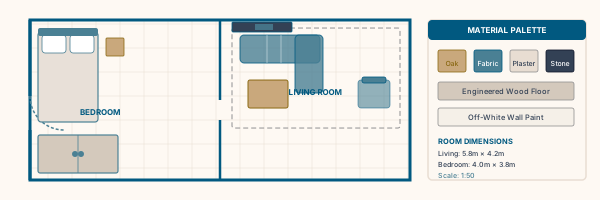
Interior Room Visualisation
Interior DesignInterior Room Visualisation
Model and render a furnished room — living room or bedroom — with accurate materials, lighting and camera composition.
Interior Design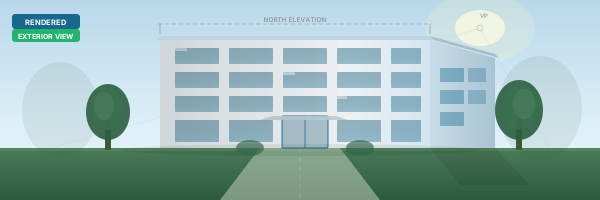
Architectural Exterior Render
Interior DesignArchitectural Exterior Render
Set up a daylight exterior render of a residential building facade with landscaping and sky environment.
Interior Design Kitchen or Bathroom Render
Interior DesignKitchen or Bathroom Render
Model a kitchen or bathroom interior with cabinetry, countertops, fixtures and photorealistic V-Ray materials.
Interior Design Office Space Visualisation
Interior DesignOffice Space Visualisation
Create an office interior visualisation with artificial lighting, glass, polished floor and furniture.
Interior Design Presentation-Ready Image
Interior DesignPresentation-Ready Image
Take a completed 3ds Max render through post-processing in Photoshop to produce a polished client-ready presentation image.
Interior DesignIs This Course for You?
Who Should Join 3ds Max Training?
Architecture students who want to produce photorealistic visualisations of their designs
Interior design students needing 3D rendering skills for client presentations
Civil engineering students working on project visualization
Working professionals in architecture, construction or real estate who need 3D presentation skills
AutoCAD or Revit users who want to add high-quality rendering to their workflow
Graphic design students interested in architectural and product visualisation
After the Course
Career Opportunities After 3ds Max Training
These are roles and sectors where this software skill is typically valued. Job outcomes depend on your background, portfolio and other factors.
Architectural visualisation artist at architecture or real estate firms
3D visualiser for interior design studios and home decor brands
Rendering artist for construction, real estate marketing and project brochures
BIM visualisation support specialist working with Revit and 3ds Max
Freelance 3D rendering and visualisation artist
VR content creator for architectural walkthroughs
Training Delivery
Classroom, Online and Flexible Training Options
Classroom Training — HSR Layout, Bangalore
CADD Mentors provides classroom training support from its HSR Layout setup in Bangalore. Batch availability is limited and sessions are scheduled on a batch basis. Learn more about our HSR Layout centre →
Online Training — Live Instructor-Led, Pan India
Online training is available for students who prefer to learn remotely. The same syllabus, projects and instructor support are provided online. Students from across India join our online programmes.
Support
Frequently Asked Questions - 3ds Max Training
- Is 3ds Max training available in Bangalore at CADD Mentors?
- Yes. CADD Mentors offers 3ds Max training from our HSR Layout setup in Bangalore. Classroom sessions are batch-based. Online training is also available for students who prefer to learn remotely.
- Do I need prior 3D or CAD experience to join the 3ds Max course?
- No prior 3D experience is required. Our 3ds Max course starts from the interface and builds through modelling, materials and rendering step by step. Familiarity with AutoCAD or Revit is helpful but not mandatory.
- Does the course include V-Ray rendering?
- Yes. Our 3ds Max course includes an introduction to V-Ray — covering materials, lighting and render settings for photorealistic output. V-Ray is the most widely used rendering engine for architectural visualisation.
- What is 3ds Max used for in architecture and interior design?
- 3ds Max is used to create high-quality 3D models and photorealistic renders of architectural spaces — both interiors and exteriors. It allows designers to present their designs to clients in a realistic, visual format before construction begins.
- Can I learn 3ds Max online through CADD Mentors?
- Yes. Online 3ds Max training is available with live instructor-led sessions. The syllabus, project work and software guidance are the same as classroom training.
Start Your CAD Learning Journey with CADD Mentors
Speak with our counsellor, choose the right course for your goal and attend a free demo before joining.