
Civil 3D Training in Bangalore
Civil 3D Training in Bangalore at CADD Mentors. Learn AutoCAD Civil 3D for road design, grading, drainage, survey and infrastructure projects. Classroom and online available.
Course Details
Civil 3D Training
Duration
60 Hours
Mode
Classroom + Online
Software
AutoCAD Civil 3D, Civil 3D 2024
Eligibility
Engineering / Design students · Professionals
Certificate
Included on completion
Delivery
HSR Layout · Online India
About This Course
Civil 3D Training in Bangalore at CADD Mentors is a practical course covering AutoCAD Civil 3D — the industry-standard software for civil infrastructure design. Civil 3D is used by civil engineers, surveyors and infrastructure designers for road layout, site grading, surface modelling, drainage networks and construction document preparation.
This Civil 3D course is designed for civil engineering students and professionals who want to go beyond 2D AutoCAD drafting and learn intelligent, model-based civil design workflows.
CADD Mentors provides Civil 3D training from our HSR Layout setup in Bangalore. Online training is available for students across India.
Best suited for:
Curriculum
What You Will Learn in Civil 3D Training
Civil 3D interface, drawing environment and data shortcuts workflow
Points and point groups: importing survey data, point styles and labelling
Surfaces: creating, editing and analysing TIN surfaces from points and contours
Alignments: road centreline design, horizontal geometry and stationing
Profiles: existing ground profiles and design profiles for road projects
Corridors: creating road corridor models from assemblies and subassemblies
Grading: grading objects, feature lines and volume calculations
Pipe networks: storm drainage and sanitary sewer design and layout
Quantity takeoffs and mass haul analysis
Plan and profile sheet production from Civil 3D model
Course Structure
Civil 3D Training — Syllabus Modules
Module 1 – Civil 3D Interface and Project Setup
Drawing environment, toolspace, data shortcuts, Civil 3D object styles and label styles.
Module 2 – Points and Survey Data
Point creation and import, point groups, description key sets, surface creation from points.
Module 3 – Surfaces
TIN surface creation, editing, analysis tools — slope, elevation banding, contours and watersheds.
Module 4 – Alignments and Road Centreline Design
Horizontal alignment creation, geometry editing, stationing, offset alignments and design constraints.
Module 5 – Profiles and Vertical Geometry
Existing ground profile sampling, design profile creation, vertical curves, profile view setup.
Module 6 – Corridors and Cross-Sections
Assembly and subassembly concepts, corridor modelling for roads, cross-section views and quantity extraction.
Module 7 – Grading and Pipe Networks
Grading objects and feature lines for site grading, pipe network layout for drainage and sewer systems.
Module 8 – Output and Sheet Production
Plan and profile sheets, quantity reports, data export to AutoCAD and third-party software.
Not sure if this course is right for you?
Talk to a counsellor before you enrol - no commitment required.
Hands-On Learning
Course Project Examples
These are example project tasks you will practise during the training. Visuals are illustrative — they represent the type of work covered, not actual student output.
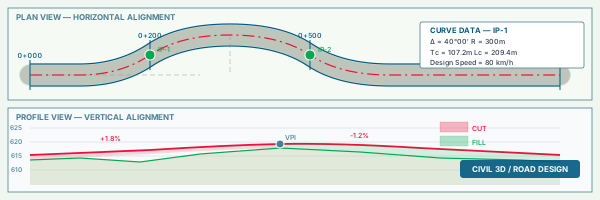
Road Alignment Design
Civil CADRoad Alignment Design
Design a road centreline alignment with horizontal geometry, stationing and offset markings for a site layout.
Civil CAD Road Corridor Model
Civil CADRoad Corridor Model
Build a corridor model for a two-lane road using standard assemblies, including carriageway, kerb and footpath.
Civil CAD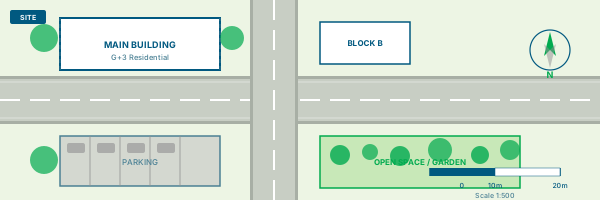
Site Grading Project
Civil CADSite Grading Project
Create a grading plan for a site with cut-and-fill volumes, feature lines and a finished surface model.
Civil CAD Drainage Network Layout
Civil CADDrainage Network Layout
Design a storm drainage pipe network including manholes, inlets and pipe sizing for a residential site.
Civil CAD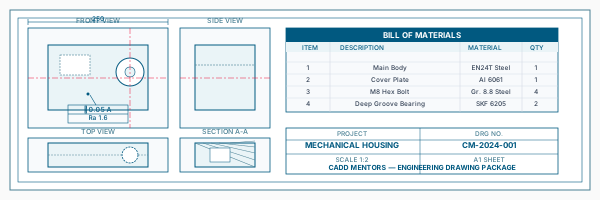
Plan and Profile Sheets
Civil CADPlan and Profile Sheets
Generate plan and profile drawing sheets directly from the Civil 3D model for a road design project.
Civil CADIs This Course for You?
Who Should Join Civil 3D Training?
Civil engineering students preparing for infrastructure design roles
Surveying and geomatics students working with survey data and surface modelling
Highway and transportation engineering students
Working professionals in road design, site development or municipal engineering
AutoCAD users who want to advance into intelligent civil design tools
After the Course
Career Opportunities After Civil 3D Training
These are roles and sectors where this software skill is typically valued. Job outcomes depend on your background, portfolio and other factors.
Civil design engineer at highway or infrastructure consultancies
Road design technician at government or private infrastructure firms
Survey data processing engineer using Civil 3D
Site development engineer for townships, industrial or commercial projects
BIM-enabled civil engineer for large-scale infrastructure projects
Drainage and utility design engineer
Training Delivery
Classroom, Online and Flexible Training Options
Classroom Training — HSR Layout, Bangalore
CADD Mentors provides classroom training support from its HSR Layout setup in Bangalore. Batch availability is limited and sessions are scheduled on a batch basis. Learn more about our HSR Layout centre →
Online Training — Live Instructor-Led, Pan India
Online training is available for students who prefer to learn remotely. The same syllabus, projects and instructor support are provided online. Students from across India join our online programmes.
Software Resources
Official Software References
These links point to official software and product pages that can help learners understand the tools covered in this course.
Software names and product names are trademarks of their respective owners. CADD Mentors is an independent training provider and is not affiliated with or endorsed by these companies.
Support
Frequently Asked Questions - Civil 3D Training
- Is Civil 3D training available in Bangalore at CADD Mentors?
- Yes. CADD Mentors offers Civil 3D training from our HSR Layout setup in Bangalore. Classroom sessions are batch-based. Online training is also available for students outside Bangalore.
- What is AutoCAD Civil 3D and how is it different from AutoCAD?
- AutoCAD Civil 3D is a specialised version of AutoCAD built for civil engineering design. While AutoCAD handles general 2D drafting and 3D modelling, Civil 3D adds intelligent objects for roads, surfaces, drainage networks, corridors and site grading that update dynamically as design parameters change.
- Do I need to know AutoCAD before learning Civil 3D?
- Basic AutoCAD knowledge is helpful since Civil 3D shares the same drawing environment. However, our course covers the Civil 3D interface from scratch and includes enough AutoCAD fundamentals to get started.
- Who is Civil 3D training suitable for?
- Civil 3D training is most relevant for civil engineering students and professionals in road design, site development, drainage, surveying and infrastructure planning.
- What types of projects are covered in the Civil 3D course?
- The course covers road alignment design, surface modelling, corridor design, grading plans and drainage network layout — all based on practical civil infrastructure scenarios.
- Can I learn Civil 3D online through CADD Mentors?
- Yes. Online Civil 3D training is available with live instructor-led sessions. The syllabus and project coverage are the same as classroom training.
Start Your CAD Learning Journey with CADD Mentors
Speak with our counsellor, choose the right course for your goal and attend a free demo before joining.