
ANSYS Mechanical Training in Bangalore
ANSYS Mechanical Training in Bangalore at CADD Mentors. Learn finite element analysis (FEA) for structural, thermal and dynamic simulation. Suitable for mechanical and aerospace engineers.
Course Details
ANSYS Mechanical Training
Duration
60 Hours
Mode
Classroom + Online
Software
ANSYS Workbench, ANSYS Mechanical + more
Eligibility
Engineering / Design students · Professionals
Certificate
Included on completion
Delivery
HSR Layout · Online India
About This Course
ANSYS Mechanical Training in Bangalore at CADD Mentors is a practical finite element analysis (FEA) course covering structural simulation, thermal analysis and dynamic analysis using ANSYS Workbench. ANSYS is the most widely used CAE tool for validating engineering designs — allowing engineers to simulate real-world loading before building physical prototypes.
CADD Mentors provides ANSYS training from our HSR Layout setup in Bangalore. Online training is available for students across India.
Best suited for:
Curriculum
What You Will Learn in ANSYS Mechanical Training
FEA fundamentals: element types, pre-processing, solving and post-processing
ANSYS Workbench interface, project schematic and geometry import
Geometry preparation using SpaceClaim and DesignModeler
Mesh types, mesh controls and mesh quality assessment
Static structural analysis: loads, supports and boundary conditions
Reading results: deformation, von Mises stress, principal stresses and safety factor
Steady-state thermal analysis and thermal-structural coupling
Modal analysis: natural frequency extraction and mode shape interpretation
Introduction to fatigue analysis using S-N curve approach
Parametric study workflow for design optimisation
Course Structure
ANSYS Mechanical Training — Syllabus Modules
Module 1 – FEA Theory and Workbench Introduction
FEA fundamentals, element types, workflow overview and ANSYS Workbench interface.
Module 2 – Geometry Preparation
Importing CAD models, SpaceClaim cleanup, mid-surface extraction and feature simplification.
Module 3 – Meshing
Mesh generation methods, quality checks and mesh independence study on a simple component.
Module 4 – Static Structural Analysis
Material assignment, load and support application, full static analysis on a mechanical bracket.
Module 5 – Thermal Analysis
Steady-state thermal boundary conditions, heat transfer setup and coupling to structural analysis.
Module 6 – Modal and Dynamic Analysis
Natural frequency extraction, mode shape interpretation and introduction to harmonic response.
Module 7 – Fatigue and Design Optimisation
Fatigue life calculation on a cyclically loaded component and parametric study of geometry changes.
Module 8 – Projects and Review
Full analysis project with geometry preparation, meshing, boundary conditions, results and report.
Not sure if this course is right for you?
Talk to a counsellor before you enrol - no commitment required.
Hands-On Learning
Course Project Examples
These are example project tasks you will practise during the training. Visuals are illustrative — they represent the type of work covered, not actual student output.
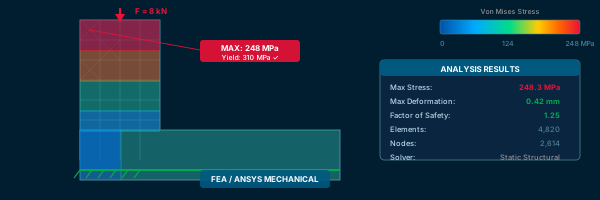
Structural Bracket Analysis
CAEStructural Bracket Analysis
Static structural analysis of a mounting bracket under combined loading — identify stress concentrations and check against material yield strength.
CAE Shaft Bending Analysis
CAEShaft Bending Analysis
Analyse a rotating shaft under bending loads, check deformation and calculate factor of safety.
CAE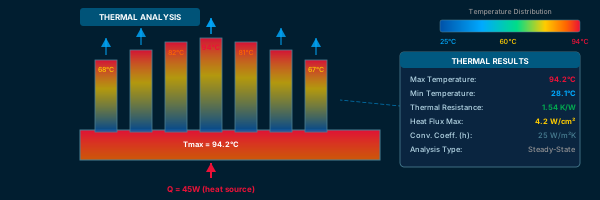
Thermal Heat Sink Study
CAEThermal Heat Sink Study
Steady-state thermal analysis of a heat sink, evaluate temperature distribution and convection effects.
CAE Modal Analysis of a Plate
CAEModal Analysis of a Plate
Extract natural frequencies of a thin plate and interpret the first five mode shapes.
CAE Component Fatigue Life Calculation
CAEComponent Fatigue Life Calculation
Apply a cyclic load on a notched component, calculate fatigue life using S-N curve and compare with design life.
CAEIs This Course for You?
Who Should Join ANSYS Mechanical Training?
Mechanical engineering students preparing for simulation or design validation roles
Aerospace and aeronautical engineering students targeting structural analysis positions
Production and manufacturing engineers learning about failure analysis and design robustness
Working professionals in product development, R&D or quality engineering
CAD engineers who want to add FEA simulation to their skill set
Candidates applying for simulation engineer or CAE analyst roles
After the Course
Career Opportunities After ANSYS Mechanical Training
These are roles and sectors where this software skill is typically valued. Job outcomes depend on your background, portfolio and other factors.
FEA analyst or simulation engineer in mechanical or aerospace companies
CAE engineer in automotive tier-1 or OEM organisations
Structural analysis engineer in infrastructure or defence sectors
Design validation engineer in product development teams
R&D engineer in heavy engineering or energy equipment companies
Engineering simulation consultant for product development projects
Training Delivery
Classroom, Online and Flexible Training Options
Classroom Training — HSR Layout, Bangalore
CADD Mentors provides classroom training support from its HSR Layout setup in Bangalore. Batch availability is limited and sessions are scheduled on a batch basis. Learn more about our HSR Layout centre →
Online Training — Live Instructor-Led, Pan India
Online training is available for students who prefer to learn remotely. The same syllabus, projects and instructor support are provided online. Students from across India join our online programmes.
Software Resources
Official Software References
These links point to official software and product pages that can help learners understand the tools covered in this course.
Software names and product names are trademarks of their respective owners. CADD Mentors is an independent training provider and is not affiliated with or endorsed by these companies.
Support
Frequently Asked Questions - ANSYS Mechanical Training
- Is ANSYS training available in Bangalore at CADD Mentors?
- Yes. CADD Mentors offers ANSYS Mechanical training from our HSR Layout setup in Bangalore. Classroom sessions are batch-based. Online training is also available.
- What is ANSYS Mechanical used for?
- ANSYS Mechanical is a finite element analysis (FEA) tool used to simulate how engineering components respond to real-world forces — including stress, deformation, temperature, vibration and fatigue. It helps engineers validate designs before physical prototyping.
- Do I need to know CAD software before learning ANSYS?
- It helps to have some exposure to 3D CAD, as ANSYS requires a geometry to analyse. ANSYS Workbench includes geometry tools (SpaceClaim and DesignModeler) for preparing models, which are covered in the course.
- Who is ANSYS training suitable for?
- ANSYS training is suitable for mechanical engineering students, aerospace and aeronautical engineering students, production engineers and working professionals in structural analysis, product validation or R&D roles.
- What is the duration of the ANSYS course?
- The ANSYS Mechanical course at CADD Mentors is approximately 60 hours, covering static structural, thermal, modal and an introduction to fatigue analysis.
- Can I learn ANSYS online through CADD Mentors?
- Yes. Online ANSYS training is available with live instructor-led sessions. The syllabus and simulation exercises are the same as classroom training.
Start Your CAD Learning Journey with CADD Mentors
Speak with our counsellor, choose the right course for your goal and attend a free demo before joining.