
SolidWorks Training in Bangalore
SolidWorks Training in Bangalore at CADD Mentors. Practical parametric 3D modelling, assemblies and drawings for mechanical engineering students and professionals. Classroom and online.
Course Details
SolidWorks Training
Duration
60 Hours
Mode
Classroom + Online
Software
SolidWorks 2024, SolidWorks Simulation
Eligibility
Engineering / Design students · Professionals
Certificate
Included on completion
Delivery
HSR Layout · Online India
About This Course
SolidWorks Training in Bangalore at CADD Mentors is a structured, hands-on mechanical CAD course for engineering students and professionals. SolidWorks is one of the most widely used parametric 3D CAD tools in mechanical engineering, product design and manufacturing. This course covers part modelling, assembly design, engineering drawings and an introduction to simulation.
CADD Mentors provides SolidWorks training from our HSR Layout setup in Bangalore, with online training available for students outside the city.
Best suited for:
Curriculum
What You Will Learn in SolidWorks Training
SolidWorks interface, feature manager tree and design intent
Sketch tools and fully defined sketches with geometric relations
Base features: extrude, revolve, sweep, loft and fillet
Pattern, mirror, shell, rib, draft and design table features
Assembly constraints: coincident, concentric, tangent and parallel
Assembly motion analysis and interference detection
Exploded views and bill of materials (BOM) generation
Engineering drawing views, GD&T annotations and title blocks
Introduction to SolidWorks Simulation for static stress analysis
Result interpretation: deformation, stress and factor of safety
Course Structure
SolidWorks Training — Syllabus Modules
Module 1 – Interface and Sketch Fundamentals
SolidWorks UI, feature tree, document properties, 2D sketch workflow and smart dimension.
Module 2 – Part Modelling
Base and secondary features for mechanical components: brackets, flanges, shafts and housings.
Module 3 – Advanced Part Features
Patterns, mirrors, sweeps, lofts, multi-body parts, equations and design tables.
Module 4 – Assembly Design
Assembly constraints and motion, sub-assemblies, interference and clearance checks.
Module 5 – Engineering Drawings
Full drawing production workflow from 3D model to annotated, toleranced manufacturing drawing.
Module 6 – Introduction to Simulation
Static stress analysis on a simple part, result interpretation and design optimisation.
Module 7 – Projects and Review
End-to-end project: model a mechanical assembly, generate exploded views, BOM and drawing set.
Not sure if this course is right for you?
Talk to a counsellor before you enrol - no commitment required.
Hands-On Learning
Course Project Examples
These are example project tasks you will practise during the training. Visuals are illustrative — they represent the type of work covered, not actual student output.
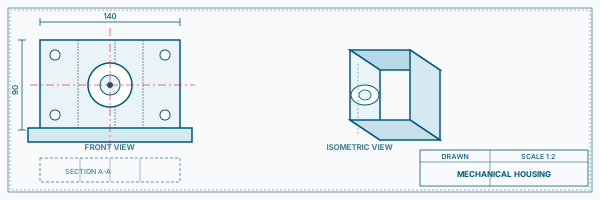
Bracket and Mounting Assembly
Mechanical CADBracket and Mounting Assembly
Model a steel mounting bracket with holes and fillets, then assemble with fasteners and check constraints.
Mechanical CAD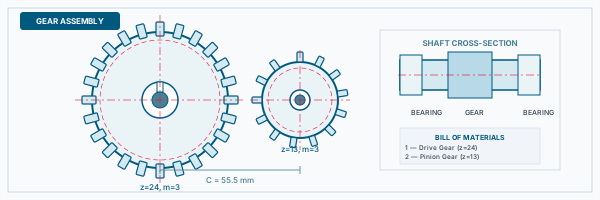
Shaft and Bearing Housing
Mechanical CADShaft and Bearing Housing
Create a rotating shaft with bearings and housing, showing assembly mates and motion simulation.
Mechanical CAD Plastic Enclosure Design
Mechanical CADPlastic Enclosure Design
Design a thin-wall plastic shell with ribs, bosses and draft angles for injection moulding.
Mechanical CAD Mechanical Drive Assembly
Mechanical CADMechanical Drive Assembly
Model a simple gear or pulley drive with exploded view and complete bill of materials.
Mechanical CAD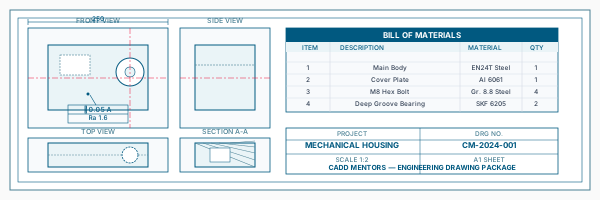
Engineering Drawing Package
Mechanical CADEngineering Drawing Package
Generate a full manufacturing drawing set from a 3D part model with GD&T and title block.
Mechanical CADIs This Course for You?
Who Should Join SolidWorks Training?
Mechanical engineering students preparing for design or manufacturing roles
Production and industrial engineering students
Automobile engineering students interested in vehicle component design
Diploma holders in mechanical or production engineering
Working professionals in manufacturing, FMCG or engineering consultancy
CAD professionals transitioning from 2D AutoCAD to 3D parametric tools
After the Course
Career Opportunities After SolidWorks Training
These are roles and sectors where this software skill is typically valued. Job outcomes depend on your background, portfolio and other factors.
Mechanical design engineer in manufacturing or product development companies
CAD designer or design engineer in product development firms
Tooling and die design support in automotive or FMCG sectors
Jig and fixture design in engineering workshops and factories
R&D support role in mechanical product companies
Freelance 3D modelling and design work
Training Delivery
Classroom, Online and Flexible Training Options
Classroom Training — HSR Layout, Bangalore
CADD Mentors provides classroom training support from its HSR Layout setup in Bangalore. Batch availability is limited and sessions are scheduled on a batch basis. Learn more about our HSR Layout centre →
Online Training — Live Instructor-Led, Pan India
Online training is available for students who prefer to learn remotely. The same syllabus, projects and instructor support are provided online. Students from across India join our online programmes.
Related Courses
ANSYS Mechanical Training
Mechanical CAD Courses Online
CATIA Training
NX CAD Training
SolidWorks Online Training Course
Software Resources
Official Software References
These links point to official software and product pages that can help learners understand the tools covered in this course.
Software names and product names are trademarks of their respective owners. CADD Mentors is an independent training provider and is not affiliated with or endorsed by these companies.
Support
Frequently Asked Questions - SolidWorks Training
- Is SolidWorks training available in Bangalore?
- Yes. CADD Mentors offers SolidWorks training from our HSR Layout setup in Bangalore. Sessions are batch-based. Online training is also available for students who cannot attend in person.
- Who is SolidWorks training suitable for?
- SolidWorks training is most suitable for mechanical engineering students, production engineering students, automobile engineering students and working professionals in manufacturing, design or product development.
- What is the duration of the SolidWorks course?
- The SolidWorks course at CADD Mentors covers approximately 60 hours of training, including part modelling, assembly design, drawings and an introduction to SolidWorks Simulation.
- Does SolidWorks training include hands-on projects?
- Yes. Every SolidWorks session includes practical exercises. The course ends with a project involving a complete mechanical assembly from individual parts through to assembly, drawing set and BOM.
- What is the difference between SolidWorks and AutoCAD for mechanical engineers?
- AutoCAD is primarily a 2D drafting tool. SolidWorks is a parametric 3D CAD tool used for designing mechanical parts and assemblies in 3D, with automatic drawing generation. Most mechanical engineering roles now require SolidWorks or an equivalent parametric 3D tool.
- Can I learn SolidWorks online at CADD Mentors?
- Yes. Online SolidWorks training is available with live instructor-led sessions covering the same syllabus and project work as classroom training.
Start Your CAD Learning Journey with CADD Mentors
Speak with our counsellor, choose the right course for your goal and attend a free demo before joining.