
SketchUp Training in Bangalore
SketchUp Training in Bangalore at CADD Mentors. Learn 3D modelling, architectural concept design and presentation with SketchUp Pro and LayOut. Classroom and online available.
Course Details
SketchUp Training
Duration
30 Hours
Mode
Classroom + Online
Software
SketchUp Pro, LayOut + more
Eligibility
Engineering / Design students · Professionals
Certificate
Included on completion
Delivery
HSR Layout · Online India
About This Course
SketchUp Training in Bangalore at CADD Mentors is a practical 3D modelling course covering SketchUp Pro — one of the most accessible and widely used tools for architectural concept design, interior space modelling and design presentations. SketchUp is used by architects, interior designers and civil engineers to quickly build 3D models from floor plans and produce visual presentations for clients and project teams.
This SketchUp course covers the complete modelling and documentation workflow including LayOut for producing professional presentation sheets.
CADD Mentors provides SketchUp training from our HSR Layout setup in Bangalore. Online training is available for students across India.
Best suited for:
Curriculum
What You Will Learn in SketchUp Training
SketchUp interface, drawing tools, inference engine and push-pull workflow
3D modelling from 2D floor plans and site drawings
Groups and components: creating, editing and reusing building elements
Materials and textures: applying finishes, colours and realistic surface materials
Scenes and animation: creating presentation views and walkthroughs
LayOut: producing 2D documentation and presentation sheets from SketchUp models
Importing AutoCAD plans and exporting to DWG, PDF and image formats
SketchUp 3D Warehouse: finding and using pre-made furniture and component libraries
Camera positioning, shadows and daylight for presentation-quality views
Rendering plugins overview: linking SketchUp with Lumion or V-Ray
Course Structure
SketchUp Training — Syllabus Modules
Module 1 – SketchUp Interface and Core Tools
Toolbars, drawing axes, measurement input, select, move, rotate, scale and basic shapes.
Module 2 – Push-Pull and 3D Modelling Workflow
Push-pull, follow-me, offset, 3D from 2D profiles, modelling walls, floors and roofs.
Module 3 – Groups, Components and Layers
Creating groups, making reusable components, managing layers and organising complex models.
Module 4 – Materials, Textures and Appearance
Applying and editing materials, importing custom textures, transparency and projected textures.
Module 5 – Scenes, Shadows and Camera Views
Creating named scenes, setting up cameras, enabling shadows and daylight for presentation renders.
Module 6 – LayOut for Documentation
Sending model to LayOut, creating viewports, adding dimensions, notes and producing A3/A4 presentation sheets.
Module 7 – Import, Export and 3D Warehouse
Importing AutoCAD DWG files, using 3D Warehouse components, exporting to DWG, PDF and image formats.
Not sure if this course is right for you?
Talk to a counsellor before you enrol - no commitment required.
Hands-On Learning
Course Project Examples
These are example project tasks you will practise during the training. Visuals are illustrative — they represent the type of work covered, not actual student output.
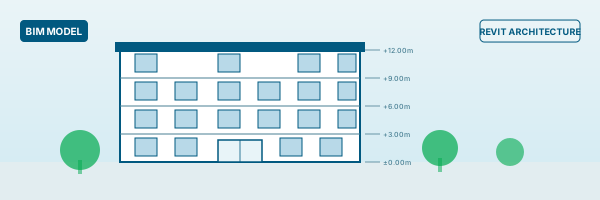
Residential Building Concept Model
Interior DesignResidential Building Concept Model
Model a simple residential building in SketchUp from a 2D floor plan, showing massing, openings and basic interior layout.
Interior Design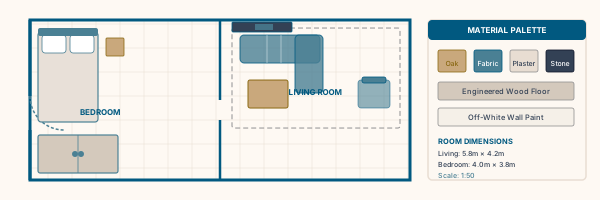
Interior Room Model
Interior DesignInterior Room Model
Create a furnished room model with walls, floors, ceiling, furniture components and applied materials.
Interior Design Site and Landscape Model
Interior DesignSite and Landscape Model
Build a site model including terrain, building footprint, pathways and basic landscaping for a presentation.
Interior Design Presentation Scenes and Walkthrough
Interior DesignPresentation Scenes and Walkthrough
Set up multiple scene views with shadows and camera positions to produce a visual presentation of a building design.
Interior Design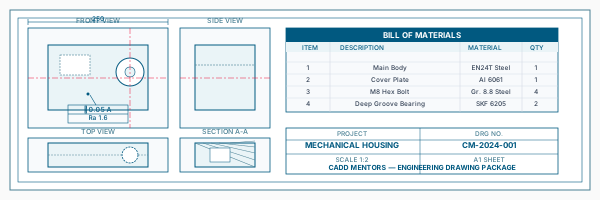
LayOut Drawing Sheet
Interior DesignLayOut Drawing Sheet
Export a SketchUp model to LayOut and create a presentation sheet with floor plan view, elevation and 3D perspective.
Interior DesignIs This Course for You?
Who Should Join SketchUp Training?
Architecture students who need concept modelling and presentation skills
Interior design students working on 3D space presentations
Civil engineering students needing quick 3D massing and site models
Working professionals in architecture or real estate who need fast 3D visualization
AutoCAD users who want a faster workflow for 3D concept design
After the Course
Career Opportunities After SketchUp Training
These are roles and sectors where this software skill is typically valued. Job outcomes depend on your background, portfolio and other factors.
Architectural concept designer at architecture or urban design firms
Interior design visualiser using SketchUp for client presentations
Real estate development presentation specialist
BIM support technician for concept and schematic design phases
Freelance 3D modeller for residential and commercial design projects
Training Delivery
Classroom, Online and Flexible Training Options
Classroom Training — HSR Layout, Bangalore
CADD Mentors provides classroom training support from its HSR Layout setup in Bangalore. Batch availability is limited and sessions are scheduled on a batch basis. Learn more about our HSR Layout centre →
Online Training — Live Instructor-Led, Pan India
Online training is available for students who prefer to learn remotely. The same syllabus, projects and instructor support are provided online. Students from across India join our online programmes.
Support
Frequently Asked Questions - SketchUp Training
- Is SketchUp training available in Bangalore at CADD Mentors?
- Yes. CADD Mentors offers SketchUp training from our HSR Layout setup in Bangalore. Sessions are batch-based. Online training is also available for students who prefer remote learning.
- What is SketchUp used for in architecture and design?
- SketchUp is used for quick 3D concept modelling, massing studies and design presentations. It is popular among architects, interior designers and urban planners for its ease of use and visual output. It works well alongside AutoCAD for 2D documentation and Lumion for high-quality rendering.
- Do I need AutoCAD experience to learn SketchUp?
- No. SketchUp is a standalone tool with its own drawing workflow. You can import AutoCAD files if you have them, but the course starts from scratch with no prior software experience required.
- Is SketchUp different from 3ds Max?
- Yes. SketchUp is primarily used for concept modelling and quick 3D presentations. 3ds Max is used for detailed, photorealistic architectural rendering and product visualisation. Many designers use both — SketchUp for concept and 3ds Max or Lumion for high-quality final renders.
- Can I learn SketchUp online through CADD Mentors?
- Yes. Online SketchUp training is available with live instructor-led sessions. The syllabus and project coverage are the same as classroom training.
Start Your CAD Learning Journey with CADD Mentors
Speak with our counsellor, choose the right course for your goal and attend a free demo before joining.