
Civil 3D Online Training Course
Civil 3D online training course at CADD Mentors. Live instructor-led AutoCAD Civil 3D training for road design, grading, drainage and corridor modelling. Join from anywhere in India.
Course Details
Civil 3D Online Training Course
Duration
60 Hours
Mode
Online
Software
AutoCAD Civil 3D, AutoCAD + more
Eligibility
Engineering / Design students · Professionals
Certificate
Included on completion
Delivery
Live Online India
About This Course
Civil 3D Online Training Course at CADD Mentors provides live instructor-led AutoCAD Civil 3D training for civil engineers and infrastructure professionals anywhere in India. This online course covers the complete Civil 3D workflow — from survey data import and surface modelling through road alignment and corridor design to drainage networks and automated plan sheet production — with the same project-based depth as the classroom programme.
Students from Hyderabad, Pune, Mumbai, Chennai, Delhi, Coimbatore, Nagpur and other cities can join live online batches without travelling to Bangalore. The course is equally suitable for final-year civil engineering students and working professionals looking to add Civil 3D to their design toolkit.
Best suited for:
Curriculum
What You Will Learn in Civil 3D Online Training Course
Civil 3D interface, toolspace, panorama and model-based design concepts
Importing survey data: points, point groups and survey database setup
Surface creation from point clouds, contours and TIN surface editing
Alignment design: horizontal geometry, tangents, curves and spiral transitions
Profile design: existing ground profile and proposed vertical alignment
Corridor modelling: assembly creation, subassemblies and corridor feature lines
Grading and earthworks: grading objects, volume calculations and mass haul
Pipe network design: storm drainage, sanitary sewer layout and structure placement
Intersection and roundabout design using Civil 3D intersection wizard
Plan production: plan and profile sheets, quantity takeoffs and LandXML export
Course Structure
Civil 3D Online Training Course — Syllabus Modules
Module 1 – Civil 3D Introduction and Interface
Civil 3D environment, toolspace, settings, drawing templates and dynamic data object workflow.
Module 2 – Survey and Surface Modelling
Importing survey points, creating TIN surfaces, editing surface data, analysis and contour display.
Module 3 – Alignment Design
Horizontal road layout: tangents, circular curves, spiral transitions and alignment properties.
Module 4 – Profile and Vertical Alignment
Sampling existing ground profile, creating proposed vertical alignments with crest and sag curves.
Module 5 – Corridor Modelling
Building a parametric road corridor using assemblies, subassemblies and feature line extraction.
Module 6 – Grading and Earthworks
Grading objects for platforms and slopes, volume dashboards, mass haul and earthworks balancing.
Module 7 – Drainage and Pipe Networks
Storm and sanitary drainage network design, structure placement, pipe sizing and profile review.
Module 8 – Plan Production and Output
Automated plan and profile sheet sets, quantity reporting, data shortcuts and LandXML export.
Not sure if this course is right for you?
Talk to a counsellor before you enrol - no commitment required.
Hands-On Learning
Course Project Examples
These are example project tasks you will practise during the training. Visuals are illustrative — they represent the type of work covered, not actual student output.
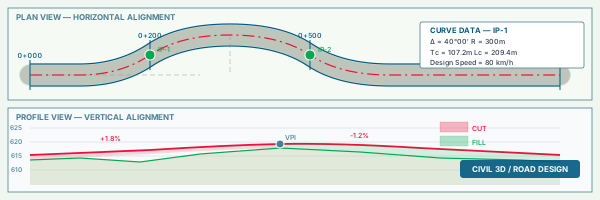
Road Alignment and Profile Design
Civil CADRoad Alignment and Profile Design
Design a 2 km road alignment with horizontal and vertical geometry, superelevation and sight distance checks.
Civil CAD Corridor Model
Civil CADCorridor Model
Build a full corridor model for the designed alignment with a two-lane road assembly and earthworks extraction.
Civil CAD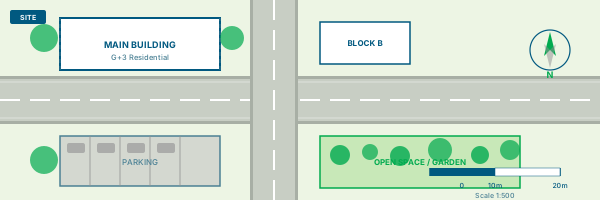
Residential Site Grading
Civil CADResidential Site Grading
Design grading for a residential plot to meet drainage requirements and calculate cut/fill volumes.
Civil CAD Storm Drainage Network
Civil CADStorm Drainage Network
Lay out a storm drainage network for a development site with inlets, pipes and outlet structure.
Civil CAD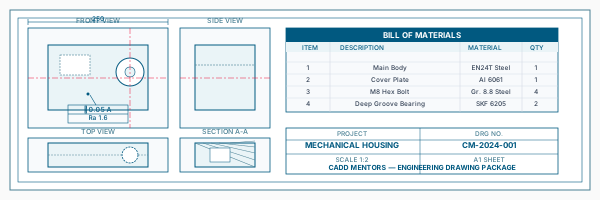
Plan and Profile Sheet Set
Civil CADPlan and Profile Sheet Set
Produce a complete plan and profile drawing set for the road project suitable for tender submission.
Civil CADIs This Course for You?
Who Should Join Civil 3D Online Training Course?
Civil engineering students and graduates who want to learn Civil 3D from any location in India
Road and highway design engineers wanting to move from AutoCAD 2D drafting to 3D corridor design
Site engineers and project engineers working on infrastructure, road or drainage projects
Professionals in Tier 2 and Tier 3 cities where Civil 3D training is not locally available
Government and private sector engineers in road, bridge and infrastructure organisations
AutoCAD users wanting to upgrade to Civil 3D for dynamic surface and corridor workflows
After the Course
Career Opportunities After Civil 3D Online Training Course
These are roles and sectors where this software skill is typically valued. Job outcomes depend on your background, portfolio and other factors.
Highway and road design engineer at infrastructure consultancies and EPC contractors
Civil 3D operator at transportation planning or urban infrastructure companies
Site engineer using corridor and grading tools for road and site development projects
Drainage design engineer for urban storm and sanitary sewer projects
Infrastructure BIM technician contributing to Civil 3D-based project datasets
Junior engineer at government road development agencies or PWD organisations
Training Delivery
Live Online Training Across India
Online Training - Live Instructor-Led, Pan India
This course is delivered through live online sessions for students across India. Students attend from their own machine, practise during the session and receive instructor support online.
Software Resources
Official Software References
These links point to official software and product pages that can help learners understand the tools covered in this course.
Software names and product names are trademarks of their respective owners. CADD Mentors is an independent training provider and is not affiliated with or endorsed by these companies.
Support
Frequently Asked Questions - Civil 3D Online Training Course
- What is the difference between this online course and the Bangalore classroom course?
- The syllabus, projects and software coverage are identical. This online course is delivered entirely through live remote sessions so students anywhere in India can attend without relocating. The Bangalore classroom course offers in-person lab access at our HSR Layout centre.
- How do live online Civil 3D sessions work?
- Sessions run over video call with screen sharing. The instructor demonstrates Civil 3D workflows live; students follow along on their own machine. Projects are shared and reviewed each session. All sessions are live — there is no pre-recorded content.
- Do I need AutoCAD experience before joining?
- Basic familiarity with AutoCAD commands and the drawing environment is helpful. The course assumes you can navigate a drawing, use object snap and work with layers before starting the Civil 3D-specific content.
- What computer specification is needed for Civil 3D?
- Civil 3D is demanding. A machine with at least 8 GB RAM (16 GB recommended), a dedicated graphics card and Windows 10 or 11 is needed. Your instructor will advise on software installation and settings before the first session.
- Can working professionals attend the online Civil 3D course?
- Yes. Evening and weekend batches are available. Working professionals in road design, site engineering or infrastructure can join without leaving their current role.
- Is Civil 3D used in India for road and highway projects?
- Yes. AutoCAD Civil 3D is used by major infrastructure consultancies, National Highways Authority of India (NHAI) contractors and state highway departments for road alignment, corridor design and drainage. Demand for Civil 3D skills is growing as projects adopt model-based delivery.
- What certification is provided after the Civil 3D online course?
- CADD Mentors issues a course completion certificate on successful completion of the project assessments. This is a training institute certificate, not an Autodesk certification.
Start Your CAD Learning Journey with CADD Mentors
Speak with our counsellor, choose the right course for your goal and attend a free demo before joining.