
BIM Courses Online
Learn BIM online with CADD Mentors through live Revit-based training, building modelling projects, documentation practice and remote guidance across India.
Course Details
BIM Courses Online
Duration
60-80 Hours
Mode
Online
Software
Autodesk Revit
Eligibility
Engineering / Design students · Professionals
Certificate
Included on completion
Delivery
Live Online India
About This Course
BIM Courses Online at CADD Mentors deliver live instructor-led Building Information Modelling training using Autodesk Revit, available to architecture students, civil engineering learners and design professionals anywhere in India. This online BIM course covers the complete BIM workflow - project setup, architectural modelling, views and documentation, schedules and sheet output - entirely through live remote sessions with no need to travel to Bangalore.
Designed for learners who want structured, practical BIM training with real instructor guidance, the programme builds from BIM fundamentals through to a complete building documentation project. Students model residential and small commercial buildings in Revit, generate coordinated drawing sets and complete a portfolio-quality BIM deliverable reviewed live online. The course supports the Revit Architecture Online Course and connects into the broader CADD Mentors BIM cluster - separate classroom Revit training is available for students who prefer in-person sessions at our HSR Layout centre.
Best suited for:
Curriculum
What You Will Learn in BIM Courses Online
BIM concepts, workflow and the difference between BIM and traditional CAD drafting
Revit project setup, template configuration and file organisation
Levels, grids and model structure for multi-storey building projects
Architectural element creation: walls, floors, roofs, ceilings and stairs
Doors, windows, furniture families and component placement and modification
View creation, floor plan annotation, section cuts and elevation documentation
Materials, rendering basics, room tags and area calculations
Schedules, quantity takeoff and automated BIM documentation
Sheet setup, title blocks, viewport placement and print-ready drawing export
Final BIM building project reviewed live with instructor feedback online
Course Structure
BIM Courses Online — Syllabus Modules
Module 1 - Introduction to BIM and Online Learning Workflow
What BIM is, why the industry is moving to model-based delivery, BIM levels and how live online sessions, screen-share and project submission work throughout this course.
Module 2 - Revit Interface, Project Setup, Levels and Grids
Revit workspace orientation, ribbon, properties palette, project browser. Template selection, units, levels, grid lines and structural axes as the skeleton of the BIM model.
Module 3 - Architectural Modelling Fundamentals
Creating walls by type and constraint, floor slabs, roofs, ceilings and stair configurations. Understanding host-based elements and model hierarchy in a multi-storey building.
Module 4 - Doors, Windows, Components and Families
Placing and modifying doors, windows, curtain walls and furniture from the Revit family library. Understanding system families versus loadable families and basic family parameter editing.
Module 5 - Views, Sections, Elevations and Documentation
Generating plan views, interior and exterior elevation views, section cuts and 3D views. Adding dimensions, text annotations, room tags and keynote references.
Module 6 - Materials, Rooms, Schedules and Quantities
Applying materials to building elements, setting up room objects, area plans and generating automated schedules for doors, windows, rooms and material quantities.
Module 7 - BIM Project Documentation and Sheet Setup
Creating title block families, setting up drawing sheets in paper space, placing viewports at defined scales, exporting to DWF or PDF for client and consultant issue.
Module 8 - Final BIM Building Project
End-to-end project: model a residential or small commercial building in Revit, generate full floor plan, section, elevation, room schedule and sheet documentation. Reviewed live online with instructor.
Not sure if this course is right for you?
Talk to a counsellor before you enrol - no commitment required.
Hands-On Learning
Course Project Examples
These are example project tasks you will practise during the training. Visuals are illustrative — they represent the type of work covered, not actual student output.
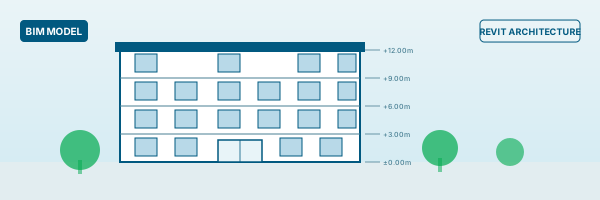
Residential BIM Model
BIMResidential BIM Model
Build a two-storey residential building in Revit from scratch - walls, floors, roof, stair - with correct levels and constraints. Submitted and reviewed online.
BIM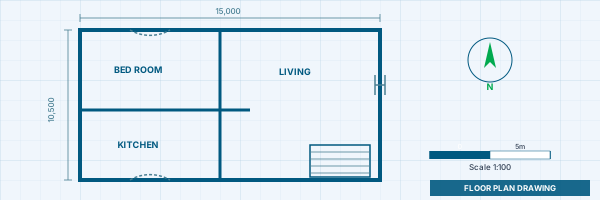
Floor Plan to Revit Building Model
BIMFloor Plan to Revit Building Model
Take a provided 2D floor plan, interpret the design intent and model the full 3D building in Revit with architectural elements, openings and components.
BIM Views, Sections and Elevation Documentation
BIMViews, Sections and Elevation Documentation
Generate a complete set of plan, section and elevation views from a modelled building with dimensions, annotations and room tags applied.
BIM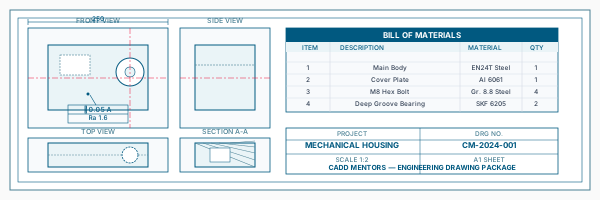
Schedule and Sheet Documentation Practice
BIMSchedule and Sheet Documentation Practice
Create automated door, window and room schedules, set up a title block, compose a drawing sheet with scaled viewports and export a PDF drawing package.
BIM Final BIM Project Presentation
BIMFinal BIM Project Presentation
Complete deliverable: a documented Revit building model with floor plans, sections, elevations, schedules and a print-ready sheet set - forming an online portfolio submission reviewed live.
BIMIs This Course for You?
Who Should Join BIM Courses Online?
Architecture students anywhere in India who want live online BIM training in Revit
Civil engineering students looking to develop BIM modelling and documentation skills
Interior design learners who want to move from 2D drafting to model-based space design
Diploma holders in civil, architectural or construction streams seeking BIM-ready skills
Working professionals in architecture, engineering or construction roles transitioning to BIM workflows
Students outside Bangalore or in cities without accessible BIM training who prefer online learning
After the Course
Career Opportunities After BIM Courses Online
These are roles and sectors where this software skill is typically valued. Job outcomes depend on your background, portfolio and other factors.
BIM modeller at architecture practices, infrastructure consultancies or construction management firms
Revit architectural modeller supporting design teams on residential, commercial or infrastructure projects
BIM documentation assistant producing drawing sets and schedules from coordinated building models
Junior BIM coordinator support role assisting senior coordinators in model review and clash reporting
Architectural drafting and detailing support producing Revit-based drawings for permits and construction
Interior BIM modelling support at design studios using Revit for space planning and client presentations
Training Delivery
Live Online Training Across India
Online Training - Live Instructor-Led, Pan India
This course is delivered through live online sessions for students across India. Students attend from their own machine, practise during the session and receive instructor support online.
Software Resources
Official Software References
These links point to official software and product pages that can help learners understand the tools covered in this course.
Software names and product names are trademarks of their respective owners. CADD Mentors is an independent training provider and is not affiliated with or endorsed by these companies.
Support
Frequently Asked Questions - BIM Courses Online
- Are these BIM courses fully online?
- Yes. This is a live instructor-led online BIM course with no classroom sessions. Students attend over video conferencing, follow along on their own Revit installation, and receive remote guidance and doubt support throughout. There is no requirement to travel to Bangalore.
- Can beginners learn BIM online through this course?
- Yes. The course starts from BIM fundamentals and the Revit interface before progressing to building modelling, documentation and project work. No prior BIM or Revit experience is required. Basic computer familiarity is sufficient.
- Is Revit required for BIM?
- Revit is the most widely used BIM authoring tool in India for architecture, structural and MEP disciplines and is the standard platform in most BIM-adopting firms. This course uses Autodesk Revit as its primary software. Other BIM platforms exist (ArchiCAD, Bentley, etc.) but Revit skills are the most in-demand entry point for BIM roles.
- What is the difference between BIM and AutoCAD?
- AutoCAD is a 2D drafting tool that produces lines and shapes representing a building. BIM (Building Information Modelling) is a process of creating an intelligent 3D model where every element - wall, door, slab, room - carries data. BIM models automatically generate floor plans, sections, elevations, schedules and quantity takeoffs from the same model. AutoCAD is typically learned first; Revit BIM is the progression for architecture, civil and construction roles.
- Do I need to come to Bangalore for this online BIM course?
- No. This course is available entirely online from any location in India. If you prefer classroom BIM training in Bangalore, separate Revit Architecture and Revit MEP classroom courses are available at our HSR Layout centre.
- Will I work on BIM projects during the course?
- Yes. Every module includes practical Revit exercises and the course concludes with a complete BIM project: a modelled building with floor plans, sections, elevations, room schedules and a print-ready sheet package, reviewed live by the instructor.
- Is this online BIM course suitable for working professionals?
- Yes. Batches are scheduled with morning, evening and weekend options. Working professionals can attend live sessions on a schedule that fits their workday and access session recordings for revision between classes.
- Will I receive a certificate after completing the course?
- Yes. You receive a CADD Mentors Certificate of Completion on successfully finishing the BIM online programme. CADD Mentors is an independent training provider and is not an Autodesk authorised training centre.
Start Your CAD Learning Journey with CADD Mentors
Speak with our counsellor, choose the right course for your goal and attend a free demo before joining.