
STAAD Pro Training in Bangalore
STAAD Pro Training in Bangalore at CADD Mentors. Learn structural analysis and design for RCC and steel structures using STAAD Pro. Practical course for civil and structural engineers.
Course Details
STAAD Pro Training
Duration
45 Hours
Mode
Classroom + Online
Software
STAAD Pro CONNECT Edition, STAAD.Pro
Eligibility
Engineering / Design students · Professionals
Certificate
Included on completion
Delivery
HSR Layout · Online India
About This Course
STAAD Pro Training in Bangalore at CADD Mentors is a practical structural analysis and design course using STAAD Pro CONNECT Edition — one of the most widely used structural engineering software tools for RCC and steel structure design. STAAD Pro is used by civil and structural engineers to model, analyse and design buildings, industrial structures and infrastructure elements as per Indian and international codes.
This STAAD Pro course covers structural modelling, loading as per IS codes, static analysis, RCC design as per IS 456 and steel design as per IS 800 — giving you the practical skills needed for structural engineering roles.
CADD Mentors provides STAAD Pro training from our HSR Layout setup in Bangalore. Online training is available for students across India.
Best suited for:
Curriculum
What You Will Learn in STAAD Pro Training
STAAD Pro interface, model creation and coordinate systems
Node and beam element creation for framed structures
Plate and solid elements for walls, slabs and foundations
Support conditions: fixed, pinned, roller and spring supports
Load definitions: dead load, live load, wind load and seismic load as per IS codes
Load combinations and load cases as per IS 456 and IS 800
Static analysis: stress, displacement and reaction results interpretation
RCC beam and column design as per IS 456
Steel structural design as per IS 800
Reading and interpreting STAAD output reports and design results
Course Structure
STAAD Pro Training — Syllabus Modules
Module 1 – STAAD Pro Interface and Model Setup
Interface overview, geometry creation, node and member commands, global and local axes.
Module 2 – Element Types and Properties
Beam, plate and solid elements, material properties, section assignment and cross-section database.
Module 3 – Support Conditions and Boundary Conditions
Fixed, hinged, roller and spring supports; foundation modelling concepts.
Module 4 – Load Definitions and IS Code Loading
Dead, live, wind and seismic loads as per IS 1893; load combinations per IS 456 and IS 800.
Module 5 – Static Structural Analysis
Running static analysis, reviewing bending moment, shear force, deflection and reaction diagrams.
Module 6 – RCC Design as per IS 456
Beam and column design using STAAD Pro's design engine, reinforcement output and design reports.
Module 7 – Steel Design as per IS 800
Steel section selection, code check, member utilisation ratios and connections overview.
Module 8 – Output, Reports and Projects
Reading STAAD output files, generating design reports and applying analysis to a complete structure.
Not sure if this course is right for you?
Talk to a counsellor before you enrol - no commitment required.
Hands-On Learning
Course Project Examples
These are example project tasks you will practise during the training. Visuals are illustrative — they represent the type of work covered, not actual student output.
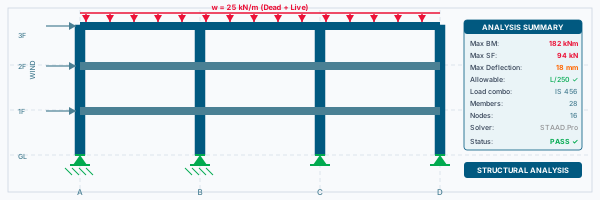
RCC Portal Frame Analysis
Civil CADRCC Portal Frame Analysis
Model and analyse a single-bay RCC portal frame under dead, live and wind loads with IS 456 design.
Civil CAD Multi-Storey RCC Building Frame
Civil CADMulti-Storey RCC Building Frame
Model a 3–5 storey RCC building frame, apply combined loading and perform beam-column design.
Civil CAD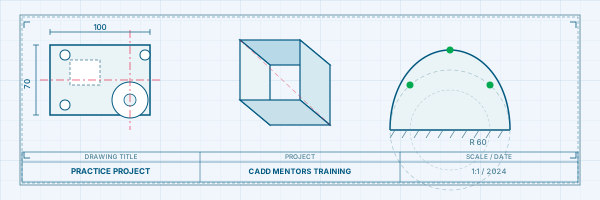
Steel Industrial Shed Structure
Civil CADSteel Industrial Shed Structure
Design a single-bay steel industrial shed with purlins, rafters and columns as per IS 800.
Civil CAD Slab and Beam System
Civil CADSlab and Beam System
Model a two-way slab with supporting beams, apply surface loads and interpret moment contours.
Civil CAD Retaining Wall or Foundation Analysis
Civil CADRetaining Wall or Foundation Analysis
Model and check a simple retaining wall or isolated footing under soil and structural loading conditions.
Civil CADIs This Course for You?
Who Should Join STAAD Pro Training?
Civil engineering students preparing for structural design roles
Structural engineering students seeking analysis software skills
Working professionals in construction or structural consultancy
Architecture students who want to understand structural behaviour
Diploma holders in civil engineering upgrading to software-based structural analysis
After the Course
Career Opportunities After STAAD Pro Training
These are roles and sectors where this software skill is typically valued. Job outcomes depend on your background, portfolio and other factors.
Structural design engineer at civil or structural consultancy firms
RCC and steel structure design support engineer
Site engineer with structural analysis skills for verification
Structural BIM technician linking analysis with Revit models
Junior structural engineer at construction or infrastructure companies
Structural analysis consultant for residential and commercial buildings
Training Delivery
Classroom, Online and Flexible Training Options
Classroom Training — HSR Layout, Bangalore
CADD Mentors provides classroom training support from its HSR Layout setup in Bangalore. Batch availability is limited and sessions are scheduled on a batch basis. Learn more about our HSR Layout centre →
Online Training — Live Instructor-Led, Pan India
Online training is available for students who prefer to learn remotely. The same syllabus, projects and instructor support are provided online. Students from across India join our online programmes.
Support
Frequently Asked Questions - STAAD Pro Training
- Is STAAD Pro training available in Bangalore at CADD Mentors?
- Yes. CADD Mentors offers STAAD Pro training from our HSR Layout setup in Bangalore. Classroom sessions are batch-based. Online training is also available for students who prefer to learn remotely.
- What is STAAD Pro used for?
- STAAD Pro is a structural analysis and design software used to model, analyse and design civil structures including buildings, bridges, industrial structures and towers. It supports RCC design as per IS 456 and steel design as per IS 800 for Indian projects.
- Who is STAAD Pro training suitable for?
- STAAD Pro training is most relevant for civil engineering and structural engineering students, as well as working professionals in construction, structural consultancy or infrastructure design who need to perform structural analysis.
- Do I need AutoCAD knowledge before learning STAAD Pro?
- AutoCAD knowledge is not required for STAAD Pro. STAAD Pro is a standalone structural analysis tool with its own geometry creation and modelling interface. However, civil engineers often use both tools on projects.
- Does STAAD Pro training cover IS code design?
- Yes. Our STAAD Pro course covers loading as per IS 1893 (seismic), IS 875 (wind and live loads) and design as per IS 456 (RCC) and IS 800 (steel) — which are the relevant Indian standard codes for structural design.
- Can I learn STAAD Pro online through CADD Mentors?
- Yes. Online STAAD Pro training is available with live instructor-led sessions. The syllabus and project coverage are the same as classroom training.
Start Your CAD Learning Journey with CADD Mentors
Speak with our counsellor, choose the right course for your goal and attend a free demo before joining.