
AutoCAD Online Training Course
Learn AutoCAD online with CADD Mentors through live CAD training, 2D drafting practice, drawing projects and remote guidance for students across India.
Course Details
AutoCAD Online Training Course
Duration
60 Hours
Mode
Online
Software
AutoCAD 2D, AutoCAD 2025
Eligibility
Engineering / Design students · Professionals
Certificate
Included on completion
Delivery
Live Online India
About This Course
AutoCAD Online Training Course at CADD Mentors is a live instructor-led 2D CAD drafting programme available to students and professionals anywhere in India. This online AutoCAD course covers the complete drafting workflow - drawing setup, core commands, editing tools, layers, annotations, blocks, layouts and plotting - delivered entirely through live remote sessions with no need to travel to Bangalore.
Suitable for civil engineering students, architecture students, mechanical learners and diploma holders across India, the course focuses on real-world drawing practice with civil, architectural and mechanical drawing examples. Students work on a series of drafting projects and complete a multi-sheet drawing package reviewed live by the instructor. Separate classroom AutoCAD training in Bangalore is available at our HSR Layout centre for students who prefer in-person sessions.
Best suited for:
Curriculum
What You Will Learn in AutoCAD Online Training Course
AutoCAD interface, workspace setup and drawing environment configuration
Units, limits, coordinate systems and precise input methods
Core drawing commands: line, polyline, circle, arc, ellipse and spline
Editing tools: trim, extend, offset, fillet, chamfer, mirror, array and scale
Layers, linetypes, object properties and drawing organisation
Dimension styles, text, multileader and annotation best practices
Blocks, hatching, external references and reusable drawing elements
Layout, viewport and plot configuration for print-ready drawing sheets
Civil, architectural and mechanical drawing practice with real-world examples
Final multi-sheet AutoCAD drafting project with review and feedback
Course Structure
AutoCAD Online Training Course — Syllabus Modules
Module 1 - Introduction to AutoCAD and CAD Drafting
AutoCAD interface orientation, ribbons, toolbars, workspace options and basic navigation - covered live online with screen-share demonstration.
Module 2 - Drawing Setup, Units and Basic Commands
Drawing environment setup: units, limits, grid, snap and coordinate entry. Core drawing commands for line, polyline, circle and arc creation.
Module 3 - Editing Tools and Precision Drafting
Editing commands - trim, extend, offset, fillet, chamfer, mirror, copy, move, rotate and scale - applied to civil, mechanical and architectural drawing exercises.
Module 4 - Layers, Properties and Drawing Organisation
Layer creation, colour and linetype assignment, layer states and freezing. Object properties and drawing cleanup for multi-discipline drawings.
Module 5 - Dimensions, Text and Annotations
Dimension styles, linear and angular dimensions, radial and diameter callouts, multileader notes, Mtext and annotative scaling for consistent drawing output.
Module 6 - Blocks, Hatching and Reusable Elements
Creating and inserting blocks, dynamic blocks, Xref basics, hatch patterns and boundary fills for architectural and engineering drawings.
Module 7 - Layouts, Viewports and Plotting
Paper space vs model space, viewport creation and scale-locking, plot style management and exporting print-ready PDF drawing sheets.
Module 8 - Final AutoCAD Drafting Project
Integrated project producing a multi-sheet drawing set - reviewed live online with instructor feedback on drawing standards, layer organisation and annotation quality.
Not sure if this course is right for you?
Talk to a counsellor before you enrol - no commitment required.
Hands-On Learning
Course Project Examples
These are example project tasks you will practise during the training. Visuals are illustrative — they represent the type of work covered, not actual student output.
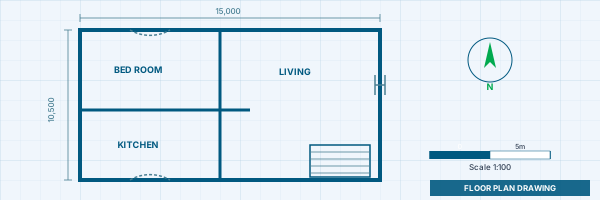
Residential Floor Plan
Civil CADResidential Floor Plan
Draft a complete 2D residential floor plan with rooms, walls, doors, windows, dimensions and annotations - submitted and reviewed online.
Civil CAD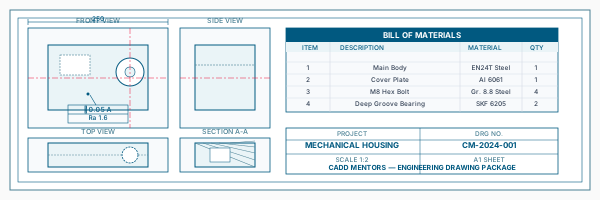
Mechanical Component Drawing
Civil CADMechanical Component Drawing
Produce orthographic views and a section drawing of a mechanical part, with correct line types, dimensions and tolerances.
Civil CAD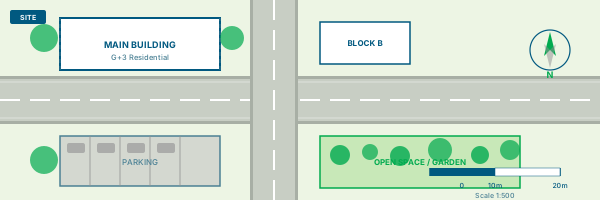
Site Layout Drawing
Civil CADSite Layout Drawing
Create a site plan drawing with boundary, road access, building footprint and basic dimensions at a specified scale with title block.
Civil CAD Title Block and Plot Sheet
Civil CADTitle Block and Plot Sheet
Set up a layout in paper space with a title block, scaled viewports and plot-ready PDF output to a standard drawing sheet size.
Civil CAD Final Multi-Sheet Drafting Package
Civil CADFinal Multi-Sheet Drafting Package
Complete deliverable: floor plan, section, elevation and site plan on separate layout sheets with a consistent title block - suitable as an online portfolio submission.
Civil CADIs This Course for You?
Who Should Join AutoCAD Online Training Course?
Civil engineering students anywhere in India who want live online AutoCAD training
Architecture students who need 2D drafting skills for academic projects or job applications
Mechanical engineering students working on component drawing practice
Interior design learners who need AutoCAD for space planning and furniture layout drafting
Diploma holders in civil, mechanical or architectural streams seeking verified CAD skills
Students in Tier 2 and Tier 3 cities where local AutoCAD training options are limited or unavailable
After the Course
Career Opportunities After AutoCAD Online Training Course
These are roles and sectors where this software skill is typically valued. Job outcomes depend on your background, portfolio and other factors.
CAD drafter or CAD operator at civil engineering firms, infrastructure consultancies or construction companies
AutoCAD drafting assistant supporting architects and structural engineers
Civil drafting support in road, drainage or building project documentation
Mechanical drafting support for component drawing and fabrication detail preparation
Architectural drafting support at design practices, project management offices or PMC firms
Interior layout drafting support at design studios and space planning consultancies
Training Delivery
Live Online Training Across India
Online Training - Live Instructor-Led, Pan India
This course is delivered through live online sessions for students across India. Students attend from their own machine, practise during the session and receive instructor support online.
Software Resources
Official Software References
These links point to official software and product pages that can help learners understand the tools covered in this course.
Software names and product names are trademarks of their respective owners. CADD Mentors is an independent training provider and is not affiliated with or endorsed by these companies.
Support
Frequently Asked Questions - AutoCAD Online Training Course
- Is this AutoCAD course conducted fully online?
- Yes. This is a live instructor-led online course with no classroom sessions. Students attend over video conferencing, follow along on their own AutoCAD installation, and receive remote support throughout. There is no need to travel to Bangalore.
- Can beginners learn AutoCAD online through this course?
- Yes. The course starts from the AutoCAD interface and basic drawing commands before progressing to editing, layers, dimensions and layout. No prior CAD experience is required.
- Is AutoCAD useful for civil and mechanical students?
- AutoCAD is the most widely used 2D drafting tool across civil engineering, architecture, mechanical engineering and interior design. Most entry-level engineering and design roles expect AutoCAD proficiency as a baseline skill.
- What is the difference between AutoCAD and Revit?
- AutoCAD is primarily a 2D drafting tool used for floor plans, engineering drawings and technical details. Revit is a Building Information Modelling (BIM) tool used for intelligent 3D building models that automatically generate drawings and schedules. AutoCAD is typically learned first, with Revit as the next step for architecture and civil professionals.
- Do I need to come to Bangalore for this course?
- No. This online course is available from any location in India. If you specifically want classroom training in Bangalore, a separate AutoCAD classroom course is available at our HSR Layout centre.
- Will I work on actual drawings during the online course?
- Yes. Every session includes practical drawing exercises and the course concludes with a multi-sheet drawing package covering a floor plan, section, elevation and site plan - reviewed live by the instructor.
- Is this online AutoCAD course suitable for working professionals?
- Yes. Batches are scheduled to include morning, evening and weekend options. Working professionals can attend live sessions at times that fit their schedule and access session recordings for revision.
- Will I receive a certificate after completing the course?
- Yes. You receive a CADD Mentors Certificate of Completion on finishing the online AutoCAD programme. CADD Mentors is an independent training provider and is not an Autodesk authorised training centre.
Start Your CAD Learning Journey with CADD Mentors
Speak with our counsellor, choose the right course for your goal and attend a free demo before joining.