
AI in CAD: How Artificial Intelligence Is Changing Engineering and Design
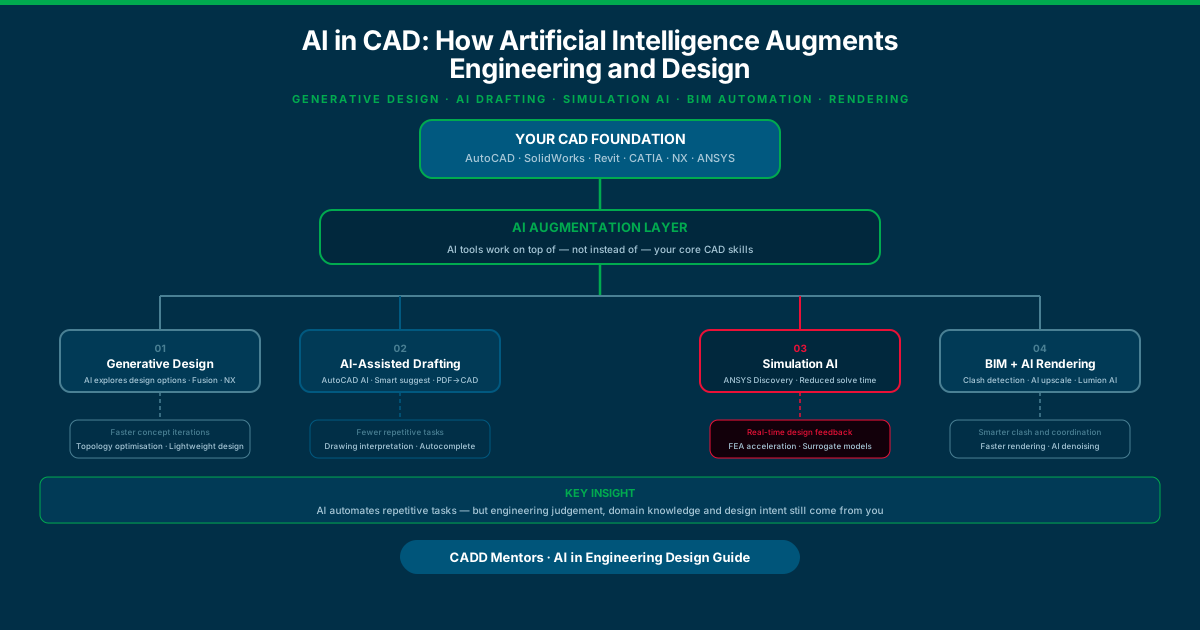
Quick answer: AI is adding powerful new capabilities to CAD tools — generative design, AI-assisted drafting, simulation acceleration, and BIM automation. But AI works on top of engineering knowledge, not instead of it. The most important thing you can do right now is learn the CAD fundamentals properly. The engineers who will benefit most from AI are those who already know enough to evaluate whether an AI output is good.
If you have spent any time on engineering forums, LinkedIn, or YouTube recently, you have probably seen some version of the claim: “AI will replace CAD engineers” or “AI will make CAD obsolete.”
Neither is true in the way these headlines suggest.
What is true is that AI is changing how engineers and designers work inside CAD tools — right now, not at some future date. AI-assisted and automation-driven features are already appearing across tools such as AutoCAD, Autodesk Fusion, ANSYS Discovery, BIM coordination platforms, and rendering software. Companies are adopting them at different speeds, and job descriptions are starting to reflect them.
This guide covers what AI is actually doing in CAD, which tools have AI features today, and what it means for your learning path. It is written for students and professionals, not for researchers — so you will find practical information rather than theoretical discussion.
What AI Can Actually Do in CAD Right Now
Let us be specific about capabilities before making any sweeping claims.
1. Generative Design
Generative design is the AI application that gets the most attention, and with good reason. It genuinely changes one part of the design process.
In traditional CAD, you draw a part. You specify every dimension, every feature, every connection. The geometry is entirely the output of your decisions.
In generative design, you specify:
- The structural load cases the part must survive
- The connection points that must stay fixed (preserved geometry)
- Zones that the part must not occupy (obstacle geometry)
- Target weight or material budget
- Manufacturing method constraints (machining, casting, additive)
The software then uses topology optimisation algorithms — which are a combination of physics simulation and AI-guided search — to generate geometry that meets all constraints with minimum material.
The result often looks organic, almost biological. These forms are difficult to arrive at through conventional sketching but are structurally efficient.
Where it is used today: Aerospace brackets, automotive structural components, medical device frames, lightweight tooling fixtures, and any application where weight reduction matters.
Tools with generative design: Autodesk Fusion (Generative Design study), Siemens NX (Topology Optimisation), CATIA (Lattice Optimisation in 3DEXPERIENCE), Altair Inspire.
What it does not do: Design a product from scratch. You still define what the part needs to do, where it connects, what forces it sees, and what manufacturing process will be used. The AI optimises within those constraints. The engineering judgement that defines the constraints still comes from you.
2. AI-Assisted Drafting and Drawing Intelligence
AutoCAD’s more recent releases include several AI-powered features that reduce repetitive manual work:
- Smart block placement: AutoCAD analyses your drawing as you work and suggests the most likely block to insert next based on context and drawing pattern.
- Command suggestions: AutoCAD’s AI suggests commands based on what you are currently doing, reducing lookup time for infrequent users.
- PDF and image import workflows: AutoCAD can help convert imported markups and legacy drawing references into usable drafting inputs — useful when digitising old or scanned drawing information.
- Markup Assist: Converts PDF markups (annotations, redlines) into model changes automatically.
These features reduce the time spent on repetitive sub-tasks within an existing drafting workflow. They do not generate designs — they assist with execution.
3. AI-Accelerated Simulation
This is one of the most practically significant AI applications for engineers in simulation roles.
Traditional FEA and CFD are computationally expensive. A high-fidelity structural analysis at fine mesh density can take hours. CFD simulations can take days. This limits how many design variants you can test.
ANSYS Discovery uses a physics-aware real-time solver that can give instant simulation feedback during the design phase — not replacing traditional high-fidelity FEA, but providing directional information much faster. It uses AI-derived surrogate models trained on large simulation datasets to predict results for novel geometries.
Siemens Simcenter has similar capabilities for thermal and structural rapid-solve workflows.
The implication for engineers: simulation can move earlier in the design cycle. Instead of waiting for a final design before running analysis, engineers can get structural feedback at concept stage.
What this does not change: The need to understand what you are simulating. Setting up boundary conditions, interpreting results, knowing when an AI-fast solve is directional and when you need a high-fidelity mesh — these still require engineering knowledge.
4. AI in BIM and Construction
BIM workflows generate enormous amounts of data — geometry, properties, relationships, schedules — across multiple disciplines (architecture, structure, MEP, civil). Coordinating these models manually is time-consuming and error-prone.
AI is being applied to several BIM workflow problems:
- Automated clash detection: Platforms like Autodesk Construction Cloud (BIM 360) and Bentley iTwin use AI to prioritise clash reports — filtering hard clashes from soft clashes, grouping related clashes, and surfacing the ones that actually need coordination action.
- Quantity take-off: AI can extract quantities from BIM models for cost estimation more quickly than manual measurement.
- Energy performance prediction: AI models trained on building geometry and climate data can predict energy performance at early design stage, informing design decisions before detailed modelling.
- Construction scheduling AI: AI tools analyse the 4D BIM model (geometry + schedule) to flag sequencing conflicts.
5. AI for Rendering and Visualisation
For interior designers, architects, and product designers, rendering quality and speed matter. AI is improving both.
- AI denoising: V-Ray, Arnold, and other render engines use AI denoising (often NVIDIA OptiX-based) to produce clean renders at lower sample counts — dramatically reducing render time for equivalent quality.
- Lumion’s AI features: Lumion uses AI for material recognition and scene optimisation, allowing faster scene building.
- Style transfer and concept visualisation: Emerging tools use AI image generation to produce concept visualisations from sketch input — useful for early-stage design communication.
The rendering AI is already in production. If you use Lumion, V-Ray, or any ray-tracing renderer, you are probably already using AI denoising even if you did not realise it.
What AI Cannot Do in CAD
This section matters as much as the section on what AI can do.
AI cannot replace engineering judgement. Generative design produces geometrically optimised forms, but the engineer must validate that the design can actually be manufactured, assembled, inspected, and maintained. A topology-optimised bracket might be lightweight but impossible to machine or inspect in service.
AI cannot replace domain knowledge. To set up a generative design study correctly, you need to understand loads, boundary conditions, and failure modes. To interpret a simulation result, you need to understand what the colour maps mean, where stress concentrations indicate a real problem versus a mesh artefact. This knowledge is not in the AI.
AI cannot make design decisions. Design involves trade-offs — performance versus cost, weight versus strength, aesthetics versus manufacturing simplicity. These trade-offs involve human judgement about what matters to the client, the user, and the budget. AI can inform trade-offs; it cannot make them.
AI output requires validation. AI surrogate simulation models are approximations. AI-generated design geometry may have features that are structurally valid but fail for other reasons (sharp re-entrant corners, impossible draft angles, incorrect tolerancing). Engineers who cannot independently evaluate AI output are not in a position to catch these failures.
Which CAD Tools Have AI Features Today?
| Software | AI feature | What it does |
|---|---|---|
| AutoCAD | Smart blocks, Markup Assist, import workflows | Faster drafting, legacy drawing review |
| Autodesk Fusion | Generative Design study | Topology-optimised geometry from constraints |
| ANSYS Discovery | Real-time physics-aware AI solver | Rapid simulation feedback at concept stage |
| Siemens NX | Topology optimisation, AI meshing | Lightweight part generation, faster meshing |
| Revit + BIM 360 | AI clash detection, quantity extraction | Coordinated BIM model management |
| Lumion | AI rendering, scene optimisation | Faster, cleaner architectural visualisations |
| V-Ray | AI denoising | Faster render output at equivalent quality |
| CATIA 3DEXPERIENCE | Lattice and generative optimisation | Lightweight structural component design |
Should You Change Your Learning Path Because of AI?
Short answer: no — but pay attention.
The fundamentals of engineering and design do not change because AI tools are added to the software. A structural engineer who does not understand how loads travel through a structure cannot effectively use ANSYS Discovery. A BIM coordinator who does not understand model discipline coordination cannot effectively configure or interpret AI-assisted clash detection.
The correct sequence remains:
- Learn the core software for your discipline — properly, not superficially
- Build real project experience where you apply that software to actual engineering problems
- Explore AI features in your tools as an additional layer that makes you faster and more capable
What changes is the ceiling. Engineers who learn both the fundamentals and the AI tools that sit on top of them will be able to produce more, faster, with better results than engineers who know only the traditional workflow.
How to Stay Relevant as AI Develops in CAD
Stay current with your primary software’s update cycle. AutoCAD, SolidWorks, Revit, ANSYS, and Fusion release significant updates annually. AI features are being added in regular update cycles. Check release notes and learn new features as they arrive — do not wait until they are standard in job descriptions.
Understand what the AI is doing, not just how to click the button. Engineers who understand the mechanism behind AI-generated outputs — why generative design produces organic forms, why AI solvers are approximations, why AI clash reports need human review — are in a better position to use, validate, and communicate AI results.
Do not abandon 2D drawing skills. AI tools generate geometry, not documentation. Engineering drawings — dimensioned, toleranced, annotated — are still required for manufacturing and inspection. 2D drafting skills remain essential.
Build a portfolio that shows AI-augmented work. As AI tools become more common, demonstrating that you can use them effectively is a competitive advantage. A portfolio project that shows generative design + traditional engineering validation tells a story that AI-only or CAD-only projects cannot.
Related Courses and Guides
If you are choosing which CAD software to learn as a foundation before exploring its AI features:
For mechanical engineers:
- SolidWorks Training in Bangalore
- ANSYS Mechanical Training
- CAD Career Roadmap for Mechanical Engineers
- SolidWorks vs CATIA vs NX — which to learn?
For civil and BIM professionals:
- BIM Courses Online
- Revit Architecture Online Course
- CAD Career Roadmap for Civil Engineers
- Revit vs BIM — understanding the difference
For interior designers:
Explore all courses:
Ready to Build the Foundation That AI Will Augment?
AI tools in CAD reward engineers and designers who have strong fundamentals. The better your core skills, the more effectively you can use, validate, and benefit from AI capabilities.
If you are unsure which software to start with, or how to build a learning plan that keeps pace with where the industry is going, speak with a CADD Mentors counsellor. We offer live, instructor-led training for all major CAD tools — online and at our HSR Layout centre in Bangalore.
Book a free demo or send an enquiry to get started.
Recommended Learning Paths
Choose the path that matches your background and career direction.
Student Starting Out — Learn Fundamentals First
Best for: Engineering and design students entering the CAD field for the first time
Working Professional — Upgrade Within Your Current Tool
Best for: Engineers already using SolidWorks, AutoCAD, Revit, or ANSYS who want to use AI features
Simulation Engineer — Adding AI to CAE Skills
Best for: Engineers in FEA, CFD, or structural analysis roles
BIM Professional — AI in Construction and Coordination
Best for: BIM coordinators, architects and civil engineers working on BIM-enabled projects