
Civil 3D vs STAAD Pro: Which Should Civil Engineers Learn?
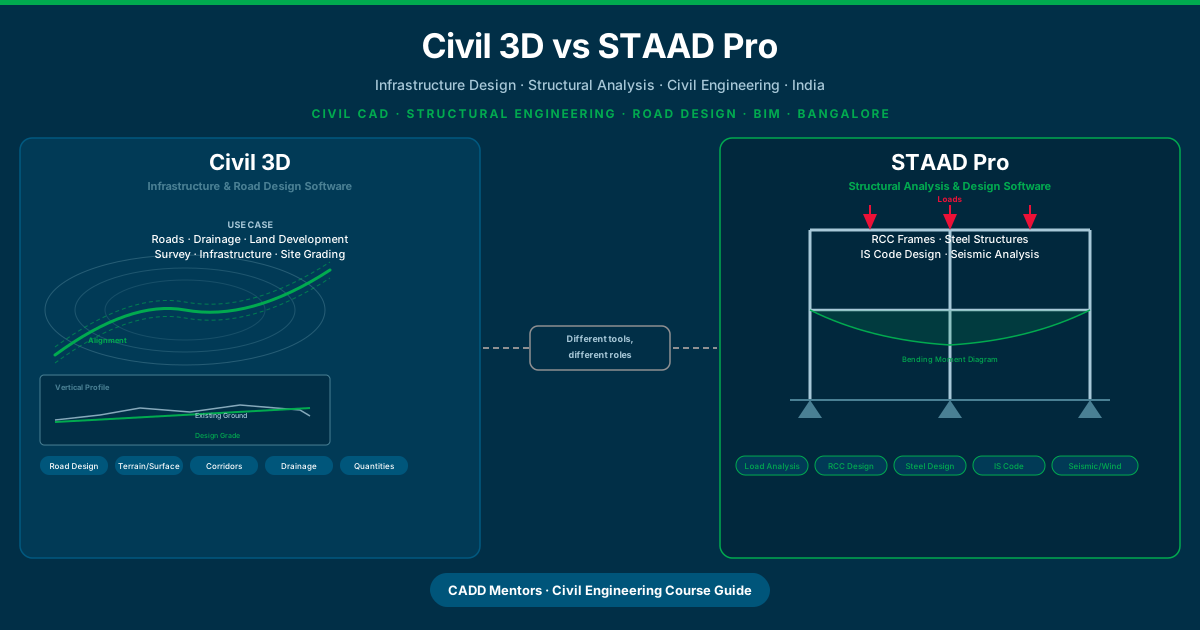
Civil 3D and STAAD Pro are both used by civil engineers. Both appear in job descriptions. Both are taught in CAD training institutes. But they do completely different things — and choosing the wrong one for your career direction wastes months of learning time.
This guide explains what each software does, who should learn which one, and how they fit into a civil engineering learning path.
Quick answer: Civil 3D is for infrastructure design — roads, terrain, drainage, site development. STAAD Pro is for structural analysis and design — RCC frames, steel structures, IS code calculations. A civil engineer choosing between them should choose based on whether their work is closer to infrastructure or to buildings and structures.
What Is Civil 3D?
Civil 3D is an infrastructure design and documentation software made by Autodesk. It is built on top of the AutoCAD platform and adds a full set of civil engineering design tools that AutoCAD does not have.
Civil 3D is used for:
- Road and highway design — horizontal alignments, vertical profiles, cross-sections, and corridor models
- Terrain and surface modelling — creating digital terrain models (DTMs) from survey data, contour analysis, cut-and-fill volumes
- Drainage and stormwater — pipe networks, catchments, hydraulic analysis
- Land development — site grading, subdivision layout, earthwork calculations
- Survey and points — importing total station data, processing survey points, generating contours
- Infrastructure quantities — automated volume reports, material schedules, quantity take-offs
Civil 3D does not perform structural calculations. It is a design and documentation tool. The output is coordinated drawings, corridor models, surfaces, and quantity reports — not structural calculations or member design.
What Is STAAD Pro?
STAAD Pro (full name: STAAD.Pro) is a structural analysis and design software made by Bentley Systems. It is one of the most widely used structural engineering tools in India and globally, particularly valued for its support of Indian Standard (IS) codes.
STAAD Pro is used for:
- Structural modelling — creating 3D models of frames, columns, beams, slabs, foundations, and trusses
- Load analysis — defining dead loads, live loads, wind loads, seismic loads, and load combinations as per IS 875 and IS 1893
- Static and dynamic analysis — computing bending moments, shear forces, axial forces, deflections, and reactions
- RCC design — designing reinforced concrete beams, columns, and slabs to IS 456
- Steel structural design — designing steel members, connections, and industrial frames to IS 800
- Foundation design — sizing isolated, combined, and raft foundations
- Seismic and wind analysis — applying IS 1893 seismic zone factors and IS 875 wind pressure calculations
STAAD Pro does not create road alignments, terrain surfaces, or drainage networks. It is an engineering calculation and analysis tool. The output is structural analysis reports, design results, and member schedules — not infrastructure drawings.
The Core Difference: Design vs Analysis
The most important distinction is this:
Civil 3D is a design and documentation tool. You use it to create the physical layout of infrastructure — where the road goes, how the terrain is shaped, where water drains, how a site is graded.
STAAD Pro is an analysis and calculation tool. You use it to verify that a structure is safe — whether a beam can carry its load, whether a column will buckle, whether a frame will survive a seismic event.
These are fundamentally different engineering tasks, and they require different software because they work in different domains.
| Feature | Civil 3D | STAAD Pro |
|---|---|---|
| Primary use | Infrastructure design and documentation | Structural analysis and design |
| Output | Drawings, corridor models, surfaces, quantities | Analysis reports, design results, member schedules |
| Works on | Roads, terrain, drainage, sites | Frames, beams, columns, slabs, foundations |
| Engineering domain | Civil infrastructure | Structural engineering |
| Indian Standard codes | Not applicable | IS 456, IS 800, IS 1893, IS 875 |
| Built on AutoCAD | Yes — requires AutoCAD platform | No — standalone software |
| BIM capability | Infrastructure BIM (IFC export) | Limited — model export to Revit Structure |
| Typical employer | Infrastructure, highway, land dev firms | Structural consultants, EPC contractors |
What Civil 3D Is Used for in Detail
Road and Highway Design
The corridor model is Civil 3D’s most powerful feature. You define a horizontal alignment (the centreline of the road in plan), create a vertical profile (the height of the road along its length), and then apply an assembly (the cross-sectional shape of the road — lanes, shoulders, kerbs, drains). Civil 3D combines these three elements into a full 3D corridor model that automatically generates cross-sections, calculates earthwork volumes, and produces coordinated drawings.
For NHAI projects, state highway work, and urban road design, Civil 3D corridors are the standard workflow. No equivalent capability exists in AutoCAD, STAAD Pro, or Revit.
Terrain and Surface Modelling
Civil 3D creates digital terrain models from survey data — total station points, GPS data, or LiDAR. These surfaces are intelligent objects that can be analysed for slopes, watersheds, and cut-and-fill volumes. When the design changes, the surface analysis updates automatically.
Drainage and Pipe Networks
Civil 3D models drainage networks — pipes, manholes, catchbasins, and outfalls — as intelligent objects with size, slope, invert levels, and connectivity data. Hydraulic analysis tools check whether the network can carry the design flow.
Land Development and Site Grading
For township development, industrial sites, and land subdivision, Civil 3D manages the grading design — how the land is shaped to drain correctly, meet finished floor levels, and minimise earthwork. Grading objects and feature lines control the surface in ways that simple AutoCAD commands cannot.
What STAAD Pro Is Used for in Detail
Structural Modelling and Analysis
A STAAD Pro model is a 3D stick model of a structure — nodes connected by members (beams and columns), with plates for slabs and walls. You assign section properties, material properties, and support conditions, then define loads and run the analysis.
The analysis produces bending moment diagrams, shear force diagrams, deflection curves, and support reactions. These results tell the structural engineer whether the chosen sections are safe, whether deflections are within IS code limits, and whether the structure will perform adequately under the design loads.
IS Code Design
STAAD Pro’s design modules apply Indian Standard codes directly. For RCC, it checks beam and column sections against IS 456 — calculating required reinforcement, checking for shear capacity, and verifying deflection limits. For steel, it checks members against IS 800 — slenderness, bending, combined axial and bending, and connection design guidance.
This code compliance checking is what makes STAAD Pro essential for structural consultants. It does not just model the structure — it tells you whether the design is code-compliant.
Seismic and Wind Analysis
Civil engineering structures in India must be designed for seismic loads under IS 1893 and wind loads under IS 875. STAAD Pro accepts seismic zone, soil type, and importance factor inputs to automatically calculate design base shear and distribute lateral forces across the structural frame. Wind pressure calculations follow a similar automated workflow.
For any multi-storey building frame or industrial structure in India, STAAD Pro’s seismic and wind modules are directly applicable to the project.
Can Civil Engineers Learn Both?
Yes, and many do — but not at the same time. Civil 3D and STAAD Pro are both substantial tools that require focused learning. The practical approach is:
- Learn AutoCAD first (foundation for both, especially for Civil 3D)
- Choose Civil 3D or STAAD Pro based on your immediate career direction
- Add the other tool later once you have practical experience in your first specialty
Civil engineers who work at the boundary of infrastructure and structures — for example, bridge engineers who handle both the approach road alignment and the structural deck design — often use both tools across their career. But they typically develop depth in one before adding the other.
Civil 3D vs STAAD Pro in India
Both tools are actively used in India, but in different sectors.
Civil 3D is prominent in:
- National Highway Authority of India (NHAI) project workflows
- State public works departments handling road projects
- Urban infrastructure and smart city projects
- Township development and land subdivision firms
- Survey and GIS-adjacent civil consultancies
STAAD Pro is prominent in:
- Structural consulting firms — residential, commercial, industrial
- EPC contractors for power plants, refineries, and industrial facilities
- Government infrastructure bodies designing bridges, flyovers, and public buildings
- Housing developers requiring structural calculations for multi-storey buildings
- Precast and prefabricated structure manufacturers
Both tools have growing relevance to BIM workflows. Civil 3D increasingly integrates with Autodesk’s infrastructure BIM ecosystem. STAAD Pro integrates with Bentley’s structural BIM tools and can export to Revit Structure for coordination.
Who Should Learn Civil 3D?
Learn Civil 3D if:
- Your civil engineering interest is in roads, highways, or infrastructure — national or state highway projects, urban road networks, flyovers
- You are targeting roles in land development — townships, industrial parks, residential layouts, site development
- You want to work in drainage and stormwater engineering — urban drainage, catchment management, flood routing at a basic level
- You are interested in survey and terrain work — processing survey data, generating contour maps, earthwork calculations
- You are targeting a role that specifically asks for Civil 3D experience in infrastructure or consultancy firm job descriptions
Civil 3D is not the right tool if your interest is primarily in building structures, RCC frames, steel design, or structural calculations.
Who Should Learn STAAD Pro?
Learn STAAD Pro if:
- Your civil engineering interest is in structural engineering — designing building frames, industrial structures, bridges
- You want to work in a structural consulting firm preparing structural designs and IS code calculations
- You are targeting roles with EPC contractors on power, process, or industrial projects where steel and RCC structure design is core work
- Your final-year project or internship involves structural analysis and you want a practical tool to run calculations
- Job descriptions you are targeting ask for STAAD Pro, structural analysis, or IS code design experience
STAAD Pro is not the right tool if your interest is in roads, drainage, terrain modelling, or site development.
What If You Are Unsure?
Many civil engineering students at the end of their degree are not sure whether they are more drawn to infrastructure or structures. A few useful questions to help:
Do you enjoy site survey, road projects, and terrain work? → Civil 3D
Did you enjoy your structural design subjects — RCC, steel structures, mechanics of materials? → STAAD Pro
Is your final-year project on a road, drainage, or site development topic? → Civil 3D
Is your final-year project on a building frame, bridge structure, or structural system? → STAAD Pro
Are you still genuinely unsure? → Learn AutoCAD first. It is useful regardless of which direction you choose, and it gives you time to gain more clarity through internships, exposure, or speaking with professionals in the field.
For help mapping a course to your specific situation, speak with a CADD Mentors counsellor via WhatsApp or the contact page. We can guide you based on your degree, your final-year project, and the roles you are targeting.
AutoCAD as the Foundation
Neither Civil 3D nor STAAD Pro replaces AutoCAD — they complement it.
Civil 3D is built on the AutoCAD platform. You work in the same drawing environment, using the same layers, blocks, dimension styles, and plot settings. Civil 3D adds civil engineering design objects on top of that drawing environment. Without AutoCAD fundamentals, the drawing environment itself will be unfamiliar and slow you down while you are trying to learn civil design workflows.
STAAD Pro has its own interface and does not depend on AutoCAD directly. However, civil engineers use AutoCAD throughout their careers for general drafting, drawing production, and documentation — regardless of whether they also use Civil 3D or STAAD Pro. Learning AutoCAD first sets you up for the full range of civil engineering drawing work.
The recommended sequence is: AutoCAD → then Civil 3D or STAAD Pro depending on your direction.
Read the AutoCAD vs Civil 3D guide for a detailed comparison of when to use each and how they relate as part of a civil engineering learning path.
STAAD Pro vs ETABS: A Quick Note
Students sometimes ask about STAAD Pro vs ETABS when researching structural analysis software.
ETABS (by CSI) is also widely used in India, particularly for multi-storey reinforced concrete building frames. Many high-rise residential and commercial building structural designs use ETABS. STAAD Pro is more broadly used across both buildings and industrial/infrastructure structural elements — trusses, towers, industrial frames, and structures that fall outside standard multi-storey building categories.
Both support IS codes. In practice, many structural engineers are familiar with both. For training purposes, STAAD Pro is the more versatile starting point because it covers a wider range of structure types and is extensively used across consulting and EPC work in India.
Civil 3D vs Revit: A Quick Note
Revit and Civil 3D are sometimes confused by students. The distinction is important.
Revit is a BIM tool for buildings — architecture, structural engineering, and MEP engineering within a building. It does not handle roads, terrain, or drainage.
Civil 3D is a BIM-capable tool for infrastructure — roads, terrain, drainage, and site development. It does not handle architectural or structural building design.
On large infrastructure projects, both tools may be used together — Revit for any building structures (toll booths, substations, bridges with complex superstructures) and Civil 3D for the surrounding infrastructure. For further reading, see the Revit vs BIM guide which covers how Revit fits into the BIM workflow.
Courses at CADD Mentors
Civil 3D Training — Bangalore (Classroom): The Civil 3D Training course in Bangalore covers the full workflow — survey points, terrain surfaces, road alignments, vertical profiles, corridors, pipe networks, grading, and quantity reports. Conducted at our HSR Layout centre with hands-on project work.
Civil 3D Online Training: The Civil 3D Online Training course covers the same content as the classroom course, delivered live by an instructor via online sessions. Available to students and professionals across India without travelling to Bangalore.
STAAD Pro Training — Bangalore (Classroom): The STAAD Pro Training course in Bangalore covers structural modelling, load definitions, IS code analysis, RCC design to IS 456, steel design to IS 800, seismic analysis to IS 1893, and foundation design. Conducted at our HSR Layout centre.
AutoCAD Training: The AutoCAD Training course is the recommended starting point before either Civil 3D or STAAD Pro. It covers 2D drafting fundamentals, dimensioning, blocks, layouts, and plotting. Also available as an AutoCAD Online Training course.
All courses are conducted by experienced instructors with live sessions, project files, and support throughout. CADD Mentors does not promise guaranteed job placement — but we do provide practical training that prepares you for the real software environments you will encounter in your career.
Summary
Civil 3D and STAAD Pro are both valuable civil engineering tools — but they are not interchangeable.
| Civil 3D | STAAD Pro | |
|---|---|---|
| What it does | Infrastructure design | Structural analysis and design |
| Who needs it | Infrastructure/road/site engineers | Structural engineers |
| IS codes | Not applicable | IS 456, IS 800, IS 1893 |
| AutoCAD required | Yes — strongly recommended | Helpful but not required |
| BIM integration | Infrastructure BIM | Structural BIM (limited) |
| India demand | Roads, highways, land dev firms | Structural consulting, EPC |
Choose the one that aligns with your engineering interest and career direction. Start with AutoCAD if you are unsure. And once you have a clear direction, go deep in one tool before adding the other.
Explore the full civil engineering learning roadmap on the online courses page, or browse related guides: AutoCAD vs Civil 3D and AutoCAD vs Revit.
Civil CAD Learning Paths
Choose the path that matches your background and career direction.
Infrastructure / Road Design Path
Best for: Civil engineers targeting highway, road, drainage and land development roles
Structural Engineering Path
Best for: Civil engineers targeting structural analysis, RCC and steel design roles
General Civil Engineering Student
Best for: B.E. / B.Tech Civil students who haven't chosen a specialisation yet
Working Professional Upgrade
Best for: AutoCAD users wanting to add a specialist civil tool
Online Learner Path
Best for: Students and professionals across India — live instructor-led online